
Overview
The Content tab turns the website into more than a title page. It lets you add the couple story, the event schedule, and practical answers guests need before the event.
Quick Facts
Best used when
Use this article when the basics are already in place and you want to add guest-facing content such as the story, schedule, and FAQ.
Menu path
Dashboard > Select website card > Edit > Content
Estimated time
5 min read
Steps
- 1
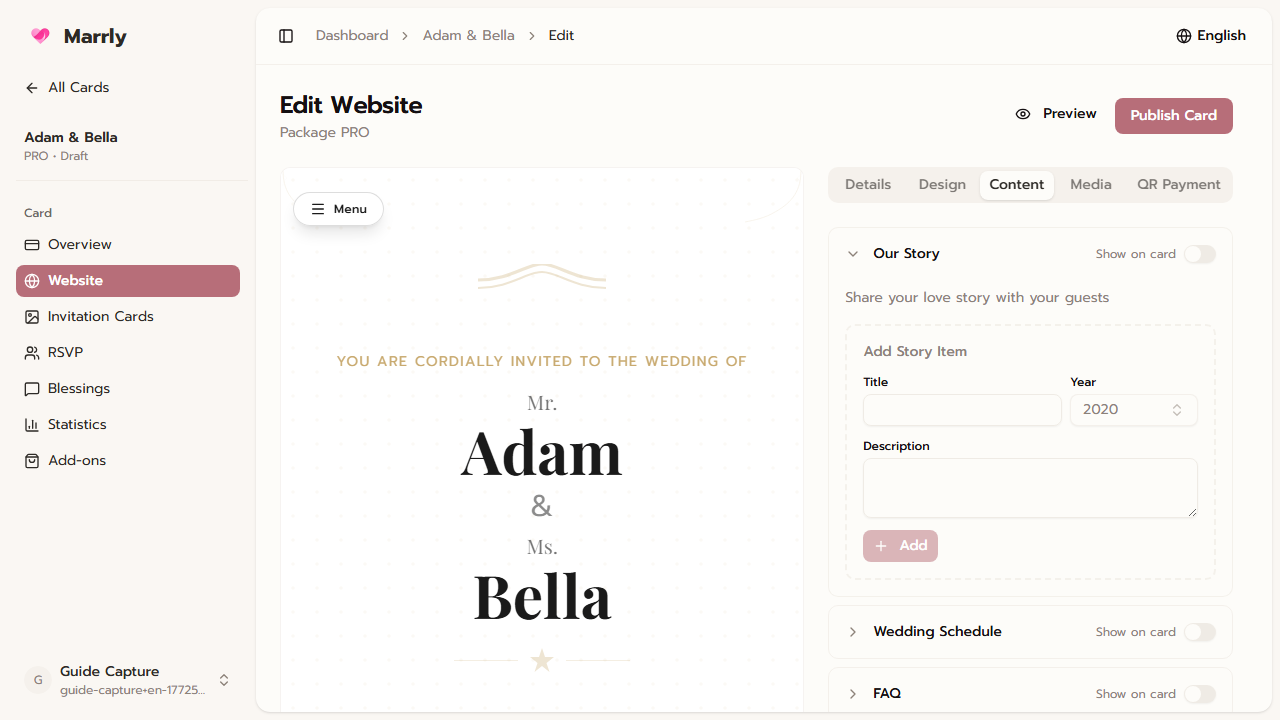
Add a story for the wedding page
The Story section is ideal for the couple background or major milestones before the wedding, and you can arrange items in the order guests should read them.
Content tab example
- 2
Build a clear event schedule
In Schedule, add the time, segment title, and short description so guests understand when to arrive and how the day flows.
- 3
Use FAQ to reduce repeated questions
FAQ works well for dress code, parking, whether children are invited, or how to travel to the venue so guests can self-serve answers.
- 4
Check the visibility of each section
Story, Schedule, and FAQ each control their own display, so verify the content is ready before enabling the section on the live card.
Common Mistakes
Result
You can complete the main guest-facing content and control Story, Schedule, and FAQ independently.